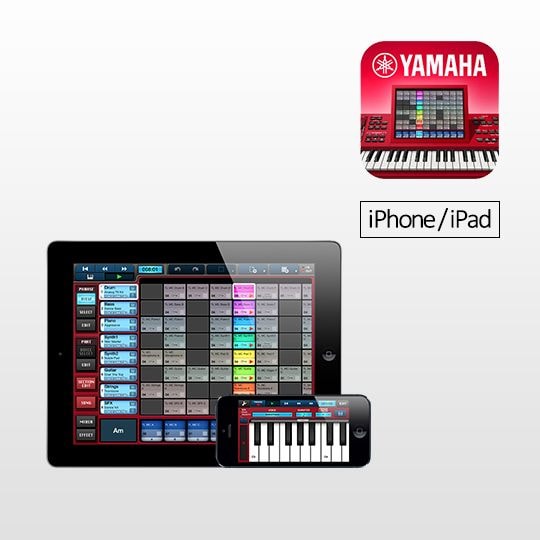
Wherever you are, you can now sketch the outline of a composition and use the ingredients to delicately craft songs on a Yamaha synthesizer, or in Steinberg Cubase.

| Works with: | iPhone 3GS/4/4S/5, iPod touch 4th/5th Generation, iPad (3rd/4th generation), iPad2 (2nd generation), iPad mini |
|---|---|
| Requirements: | Requires iOS 6.0 or later |
| Languages: | English, Japanese |
Download from the App Store
Features
Additional functions in Version 2.0
- iPhone and iPod touch support
- Audiobus support (input only)
- Support for iCloud uploads of user songs and user phrases
You can access a user song on another device using the same Apple ID. User phrases are automatically uploaded.
You can c...
Related Products
- MOX6

[MOX Series] -
The new MOX series combines a MOTIF XS sound engine, a MIDI keyboard controller with extensive DAW and VST control, multi-channel USB audio interfacing, onboard sequencing, and an extensive DAW / VST software bundle. The MOX6 and MOX8 are the most powerf...
- MOX8

[MOX Series] -
The new MOX series combines a MOTIF XS sound engine, a MIDI keyboard controller with extensive DAW and VST control, multi-channel USB audio interfacing, onboard sequencing, and an extensive DAW / VST software bundle. The MOX6 and MOX8 are the most powerf...
- S70 XS

[S90 XS/S70 XS] -
Your Perfect Performance Partner.
- S90 XS

[S90 XS/S70 XS] -
Your Perfect Performance Partner.
- MOTIF-RACK XS

-
Inspiration can strike at any time, but there's no need to wait for it. The new MOTIF-RACK XS is packed full of inspiring sounds, exciting rhythms and.....
Features
Additional functions in Version 2.0


- iPhone and iPod touch support
- Audiobus support (input only)
- Support for iCloud uploads of user songs and user phrases
You can access a user song on another device using the same Apple ID. User phrases are automatically uploaded.
You can continue working on a song created on the iPhone, by editing on an iPad.
* You first need to enable "Documents & Data" in the iCloud settings for the iPhone and iPad.
- Support for inversions and syncopation in Section Edit (including settings for 8th notes, 16th notes, and triplets), and Chord Shift function
- Two loop remix functions can now be set for one phrase
- Support for reordering, inserting, and deleting sections
- Support for changing the ordering of parts
- Tempo Delay L and R added to the effect variations
- In the Piano Roll display, support for selecting Velocity, Pitch Bend, and Control Change data, and Copy, Paste, Cut, and Delete operations
- Improved resolution for the pitch bend function
- Added Sync function to Mixdown (start recording triggered by playback start)
- Added file export support for MX49/MX61 devices
- Plus other features and improved functionality
A portable music production tool enabling composers to compose more intuitively.


With built-in phrase patterns, this MIDI loop based sequencer allows you to intuitively create compositions in a manner that is in tune with the creative process by building up sections with phrases and using these sections to build songs.
You can sketch the outline of a composition and use the ingredients to delicately craft songs on a Yamaha synthesizer, or in Steinberg Cubase.
Create a song right away as follows:
Step 1- Create phrases
You can choose from a rich selection of 382 preset phrases (the phrase is the smallest unit in the structure of a composition). Under Phrase in the View screen, tap on a cell in which no setting has been made, then tap on the Select button on the left. To listen to a preset phrase, tap on its name. It is also possible to use real-time recordings made using the keyboard within an application, or user phrases which have been created using piano roll input. Using the powerful LOOP REMIX function, it is possible to divide selected phrases at specified intervals and then order them randomly, automatically insert rolls or breaks, and thus rework them into new phrases.
Step 2- Create sections
Combine multiple phrases together to create a section. Phrases are arranged in a vertical block and playback is turned on and off using the Section button at the bottom of the screen. The phrases can be managed as a single unit.
By specifying codes for individual sections, you can easily create variations. Using the Create command you can also create a succession of new sections based on the phrase that is currently being played back, which allows production to proceed smoothly.
Step 3- Create Songs
Put together complete songs by pasting together sections. This is easily accomplished by touching the Section area and then just dragging and dropping sections into the data area. Naturally, you can also input sections by recording in real time or by using the piano roll screen.
All these methods in combination give rise to an endless series of new phrases.


Using the powerful LOOP REMIX function, it is possible to divide selected phrases at specified intervals and then order them automatically insert rolls or breaks, and thus rework them into new phrases. In V2.0, two loop remix functions can now be set for one phrase. It is also possible to use real-time recordings made using the keyboard within an application, or user phrases which have been created using piano roll input. By specifying codes for individual phrases or sections, you can easily create variations.
Additional voices and phrases

Four additional voice and phrase datapacks can be purchased directly using the application. (Dance Pop, Electronic, Hip Hop, R&B)
File export

Not only standard MIDI file format, but for Yamaha Synth (Motif XF, S90XS/S70XS, MOX6/MOX8, Motif XS, and newly MX49/MX61) the app can export an easier-to-use format. (Characteristic sounds are specified in advance. ) You can get the file by using iTunes File Sharing.
An built-in demo song composed by Daisuke Asakura

The app includes the Daisuke Asakura demo song. Daisuke Asakura is a Japanese music producer, composer and arranger. Also known as a keyboardist of the musical unit "access".
Try loading the demo song. Tap on the settings icon in the top right of the screen, select "Digital Sympathy" from the Presets under the File tab, and press the Load button to read in the song.
Other Advantages
- Built-in software synth with 92 high-quality sounds enables faithful rendering of sequence patterns
- Sound editing using filters, EG, and other effects
- Mixer function for each part
- Effects including reverb, chorus, and variations
- Audio Mix-down Function, Compatibility with SoundCloud
Since the compositions can be mixed into audio files, they can be replayed on other applications and uploaded directly into the SoundCloud.
(*To connect with and use the upload function for the SoundCloud, users must register an account with SoundCloud Inc. For further details, please access the following URL: http://soundcloud.com/)
Technology
Audio & Video
V2.0: New Functions
Overview
Support
Downloads
FAQs
Contact
Online Help
Warranty
Reviewed by 2 customers
Sort by
Displaying reviews 1-2
Awesome app very easy song creation!
By Leo
from Minneapolis
About Me Experienced
Pros
- Easy Song Creation
- Easy to Use
- Portable
- Realistic Sound
- Responsive / Good Action
Cons
- Limited Sound Selection
- No Way To Save Own Sounds
- Only 8 Tracks
Best Uses
- Accompaniment
- Electronic Music
- MIDI
- To Create Own Composition
- Travel
Comments about Yamaha mobile_sequencer:
I was skeptical at first, but this sequencer is powerful, way powerful. It reminds me of the QY70, but much easier to use. The sounds are very usable; like they were in the Qy70, and the sounds sound good together, very musical.
Some things I would like to see added...
More tracks
Ability to save sound with parameter changes, and then being able to call this up in a clip.
Audio tracks (streaming)
Sampler instrument
Bottom Line Yes, I would recommend this to a friend
Was this review helpful? Yes / No
- You may also flag this review
Cool app
By Chuck
from Colorado
About Me Experienced
Pros
- Good Sounds
Cons
- Poor Instructions
Best Uses
- Accompaniment
Comments about Yamaha mobile_sequencer:
It seem like a good product, I feel the manual is limited, I would like to see more detailed video instruction.
Bottom Line Yes, I would recommend this to a friend
Was this review helpful? Yes / No
- You may also flag this review
Displaying reviews 1-2